Feeds:
Posts
Comments

Archive for 2008

I always try to use named colors whenever I can because it makes your Xaml much easier to read! Who knows what color #1A37C5 is? Okay, so maybe some of you can “see into the matrix” but I’d much rather see something like “DarkBlue”. It’s also easier to write because you VS gives you IntelliType when entering a color for a property of type Brush or Color.

Here’s a super easy way to see all the named colors out there that Silverlight supports. This tool also supports copying the name by selecting it and using Ctrl+C. Plus, you can sort the list alphabetically, by red, blue, green, hue, saturation, or luminosity for those of us that get dizzy scanning the palette for a good “blue” to choose.

namedcolorsviewer
Click to Run

Note: Microsoft has a pretty good table of their own with all the same colors in my tool (there are 141 of them by the way, not 240 as stated on the MS site). But the colors blocks are smaller, it’s all just a big image so you can’t copy names, and it of course lacks my patented sort feature 😉

Read Full Post »

Here’s a good looking, light-weight GroupBox control for Silverlight 2 RTW.
Silverlight GroupBox Control

Download source code for VB.NET
Download source code for C#
Download the binary

According to Shawn Burke on the Microsoft Silverlight Toolkit Team, “groupbox is on the list but not in this control set

So until then, here’s a fully functional and very simple GroupBox control that you might even want to use after the Toolkit includes the GroupBox for sake of the tiny runtime size (only 9 KB).

To use all you need is:

<groupbox:GroupBox Header=”Header goes here”>
    <Button Content=”This is a placeholder for the content”/>
</groupbox:GroupBox>

In case anyone is interested, I did find one other groupbox control out there but it was created before the RTW and requires a little work to get it running on RTW and the spacing around the header was a bit off. Nevertheless, kudos to Lee for putting together something to use way back in March.

Dec 16, 2008: I added source code for C# and fixed a bug allowing the groupbox to be truely transparent by clipping the Border control where the header goes instead of relying on ZOrder to hide that portion of the border control.

Read Full Post »

Try to trap for the focus changed events (GotFocus and LostFocus) in Silverlight in a container control; I dare you! 😉 You’ll quickly realize that all the GotFocus and LostFocus events of all the children controls and their children controls fire on the container. This is of course due to event bubbling (which is a good thing). But, it makes it awefully hard to tell when the container itself is getting focus (after not having it) or loosing focus because something outside your container now has it.

For example: Create a StackPanel (MyContainer) with 2 controls in it and put that next to another control (the button)…

   <StackPanel>
      <StackPanel x:Name=”MyContainer”>
         <TextBox/>
         <TextBox/>
      </StackPanel>
      <Button Content=”button3″/>
   </StackPanel>

Now put debug statements in MyContainer’s GotFocus and LostFocus events…

Private Sub MyContainer_GotFocus(ByVal sender As Object, ByVal e As System.Windows.RoutedEventArgs) Handles MyContainer.GotFocus
    Diagnostics.Debug.WriteLine("MyContainer_GotFocus")
End Sub
 
Private Sub MyContainer_LostFocus(ByVal sender As Object, ByVal e As System.Windows.RoutedEventArgs) Handles MyContainer.LostFocus
    Diagnostics.Debug.WriteLine("MyContainer_LostFocus")
End Sub

Hmm, looks like our container lost focus… but it didn’t!? Focus is simply on another child in the same container. The events are firing like this because the children controls are bubbling up their events to the container so it looks like the container is loosing and getting focus each time. So how do we determine if focus has actually been given to a control outside the container or if focus is still inside the container?

The answer is not that hard. all we need to do is determine if at the time the LostFocus event is fired, if the item that has focus is a child of our container. And you can use the System.Windows.Input.FocusManager.GetFocusedElement method to determine which object has focus. I created a nice little IsRelated function to help determine who is a decendent.

Private Shared Function IsRelated(ByVal Child As Object, ByVal Parent As Object) As Boolean
    Return Child Is Parent OrElse (TypeOf Child Is FrameworkElement _
        AndAlso _
        IsRelated(DirectCast(Child, FrameworkElement).Parent, Parent))
End Function
 
Private HasFocus As Boolean
 
Private Sub MyContainer_GotFocus(ByVal sender As Object, ByVal e As System.Windows.RoutedEventArgs) Handles MyContainer.GotFocus
    If Not HasFocus Then
        HasFocus = True
        Diagnostics.Debug.WriteLine("MyContainer_GotFocus")
    End If
End Sub
 
Private Sub MyContainer_LostFocus(ByVal sender As Object, ByVal e As System.Windows.RoutedEventArgs) Handles MyContainer.LostFocus
    If Not IsRelated(System.Windows.Input.FocusManager.GetFocusedElement, _
            MyContainer) Then
        HasFocus = False
        Diagnostics.Debug.WriteLine("MyContainer_LostFocus")
    End If
End Sub

And that’s all there is to it. Happy coding!

Read Full Post »

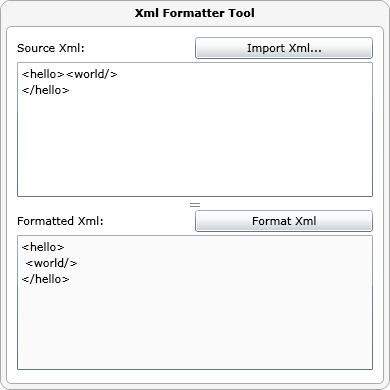
This tool provides automatic formatting for your xml document by properly indenting nested nodes with tab characters. Simply type in the xml to format or import and xml file press a button and see your perfectly formatted xml. This tool is a really useful for making your xml more readable. Check it out and bookmark it… it will come in handy!


Click to Run

Read Full Post »

In Silverlight applications practically everything can be animated to provide visually pleasing transitions between changes in your application or web page. When you hide something that is currently visible, why have it just disappear when you can make it fade away or slide off to the edge of the page? Or both? Silverlight makes these kinds of effects so much easier than ever before… so take advantage of it!

Unfortunately, there’s one control that is surprisingly a pain to support this on… the grid control. Try to animate collapsing its rows or columns by animating ColumnDefinition.Width or RowDefinition.Height via:

<DoubleAnimation Storyboard.TargetName=”Column1″ Storyboard.TargetProperty=”Width” To=”0″ Duration=”00:00:00.5″/>

and you’ll quickly discover the following runtime error:

InvalidOperationException: DoubleAnimation cannot be used to animate property Width due to incompatible type.

It turns out, Width is not of type Double but instead is of type GridLength. And GridLength has a property called Value of type Double, but Value is ReadOnly so to change the width or height you have to create a new instance of the GridLength object and set it it to the Width Property. Unfortunately, this is not something that can be done in a DoubleAnimation (that I’m aware of).

The solution: Do it yourself! Add a Name to the root element of your page, animate your own property and have your your property wrap setting the Width property on the ColumnDefinition or RowDefinition.

<DoubleAnimation Storyboard.TargetName=”Myself” Storyboard.TargetProperty=”ColumnWidth” To=”0″ Duration=”00:00:00.5″/>

' Warning: This does not work from an animation
Public Property ColumnWidth() As Double
    Get
        Return Column1.Width.Value
    End Get
    Set(ByVal value As Double)
        Column1.Width = New GridLength(value)
    End Set
End Property
WAIT: Animations can only set DependencyProperties. So the above code will not work. Instead we need to turn this property into a DependencyProperty…

Private Shared ReadOnly ColumnWidthProperty As DependencyProperty = DependencyProperty.Register("ColumnWidth", GetType(Double), GetType(Page), New Windows.PropertyMetadata(AddressOf ColumnWidthChanged))
Private Property ColumnWidth() As Double
    Get
        Return DirectCast(GetValue(ColumnWidthProperty), Double)
    End Get
    Set(ByVal value As Double)
        SetValue(ColumnWidthProperty, value)
    End Set
End Property
Private Shared Sub ColumnWidthChanged(ByVal d As DependencyObject, ByVal e As DependencyPropertyChangedEventArgs)
    DirectCast(d, Page).Column1.Width = New GridLength(DirectCast(e.NewValue, Double))
End Sub


Click To See

Download source code

Read Full Post »

Need a way to duplicate a chunk of text for each variable in a list? This tool will save you time and soar wrists by letting you create a template and a list of variables and merge the two to get a repeated chunk of text with variables injected into each iteration.


Click To Run

For example, let’s say you had a list of 100 names of colors and you wanted to generate a function in code for each. Supply the list of colors as your “variables” and set your “template” to:

function #value#() { }

And let the TemplateRepeater take it away generating a chunk of text for each color resembling:

function blue() { }

function red() { }

function green() { }

Simple but surprisingly useful! Enjoy!

Read Full Post »

Silverlight 2 introduces the ability to “push” data to the client with helper client and server duplex objects and with it opens doors to a much more responsive, scalable world of web applications.

Before Silverlight duplex, God made COMET. You can read more about COMET elsewhere but the important thing to note is that COMET has shortcomings. Because COMET was built on top of existing web technologies rather than designed from the ground up, it suffers problems with firewalls, proxy servers, & of course: browser compatibility. I’m not an expert in COMET technologies nor do I intend to knock it, but Silverlight solves these problems AND makes it a hell of of lot easier for programmers to implement pushing techniques from the server. Note: Microsoft WCF technology has introduced a number of other technologies that have made it more than possible to support push-style behavior for Windows applications already. The new thing here is that you can now do it in a cross platform web app.

Push vs. Pull. Of course there’s always the good ‘ol pull method where the client continues to ask the server if there’s anything new it should tell you about. This works well for scenarios where the server has something to tell the client about most of the time. For example, if the client needed to know what the stats of the ongoing Packers game is, it would be reasonable to just have the client check on a regular basis because you can almost assume that every minute something has changed. But what if the client needed to check if you had a new voice mail? Unless you’re far more popular than I am, 99% of the time that the client would check the server, nothing would different. In this scenario, a push would be a much better choice. Why?

Because it keeps your server scalable. If you have hundreds or thousands of clients all asking your server “is there anything new yet?” every minute, your server is going to be busy. And in scenarios where very little actually changes, it’s all unnecessary work. So give your server a break and let it tell the client when there’s actually something to say. Don’t call me; I’ll call you.

And its fast.There is no faster way for your client to get messages from the server. If you pull the server, you have to configure the client to pull every x seconds or minutes. This means that if something changes on the server right after you checked last, you have to wait until nest time. It’s like when you miss the mail man. Now you’ll have to wait until tomorrow to send that letter. And depending on how important the information is, the ability to tell the client virtually instantly could be a big deal.

We’ve got a problem Houston.With inventions like AJAX & RIAs, more and more web apps are shifting the burden from the server to the client and reducing round trips to the server. However, the drawback is its more likely that the client’s scope will increase and the client will be less likely to get updates from the server. Imagine you had a web page that showed you a list of contacts and allowed to edit info about each. In the old days with frequent round trips, you practically couldn’t do anything without a round trip and therefore a new version of that web page. The bonus was that if a new contact was added to the database, you’d suddenly see the new contact. But now, without extra work on the programmers part, the user is not likely to know about that new contact unless the users clicks back and next to reload the page.

The need isn’t special case. Almost all apps could benefit from push techniques. Not just chat clients and monitoring apps. Does your app support collaboration where another user can change the data they are looking at? In fact, any app where what the user sees information that could conceivably change could use this technique.

Programmers need to push changes to the client and it has to be easy to implement or the quality of our apps will suffer. Fortunately, the Silverlight 2 duplex features accomplish both of these objectives. So lets be good programmers and use these tools to help transform the web into a more scalable, responsive, place. They call it progress.

Read Full Post »